

Exploring the Pros and Cons of Adobe eSign API for Enterprises in 2025
Electronic signature solutions are very vital for businesses that handle large amounts of agreements, contracts, and forms. Among them, the most versatile integration solution is the Adobe eSign API, which would integrate electronic signature functionality in custom apps and workflows.
This blog exhaustively analyzes the pros and cons of the Adobe Acrobat Sign API to help you determine whether it is a great fit for your company’s needs. This guide caters to developers seeking streamlined integration solutions and decision-makers who weigh features, price, and restrictions.
Thus, the robust integration features and compliance with high-security standards made Adobe Acrobat Sign API one of the strongest e-signature solutions on the market.
However, like any tool, it has its drawbacks that affect the overall efficiency of the workflow.
By the end of this blog, you’ll gain a clear understanding of whether the Adobe Acrobat Sign API fits your organization’s requirements or if alternative solutions might be better suited to your needs.
What is Adobe Acrobat Sign API?
The Adobe Acrobat Sign API is one of the most powerful APIs for developers and companies to integrate e-signature capabilities into their applications, websites, or workflows. Using the API, organizations can automate document-signing processes, eliminate manual inefficiencies, and deliver seamless user experiences.
Key features of Adobe Sign API
- Document Management: Send, track, and manage documents for eSignatures in real-time.
- Customizable Workflows: Sign processes adapted to meet the specific needs of the business.
- Strong Security: SOC 2, HIPAA, FedRAMP compliance
- Multi-Platform Compatibility: Works with web, mobile, and desktop applications
- Developer Support: Large amounts of documentation, sample code, community forums for debugging
Adobe Acrobat Sign API Use Cases
Companies from all industries are increasingly utilizing the features of the Adobe Sign API to boost their businesses:
- Finance: Loan agreement and approval simplification.
- Healthcare: Ensure secure patient consent forms.
- Legal: Automate contract workflows for faster turnarounds.
- Retail: Simplify vendor agreements and supply chain documentation.
The Adobe Sign API integration is scalable and seamless, catering to organizations of all sizes. Its flexibility makes it an attractive solution for embedding e-signatures into any workflow, whether a startup or an enterprise.
Key Pros of Using Adobe Acrobat Sign API
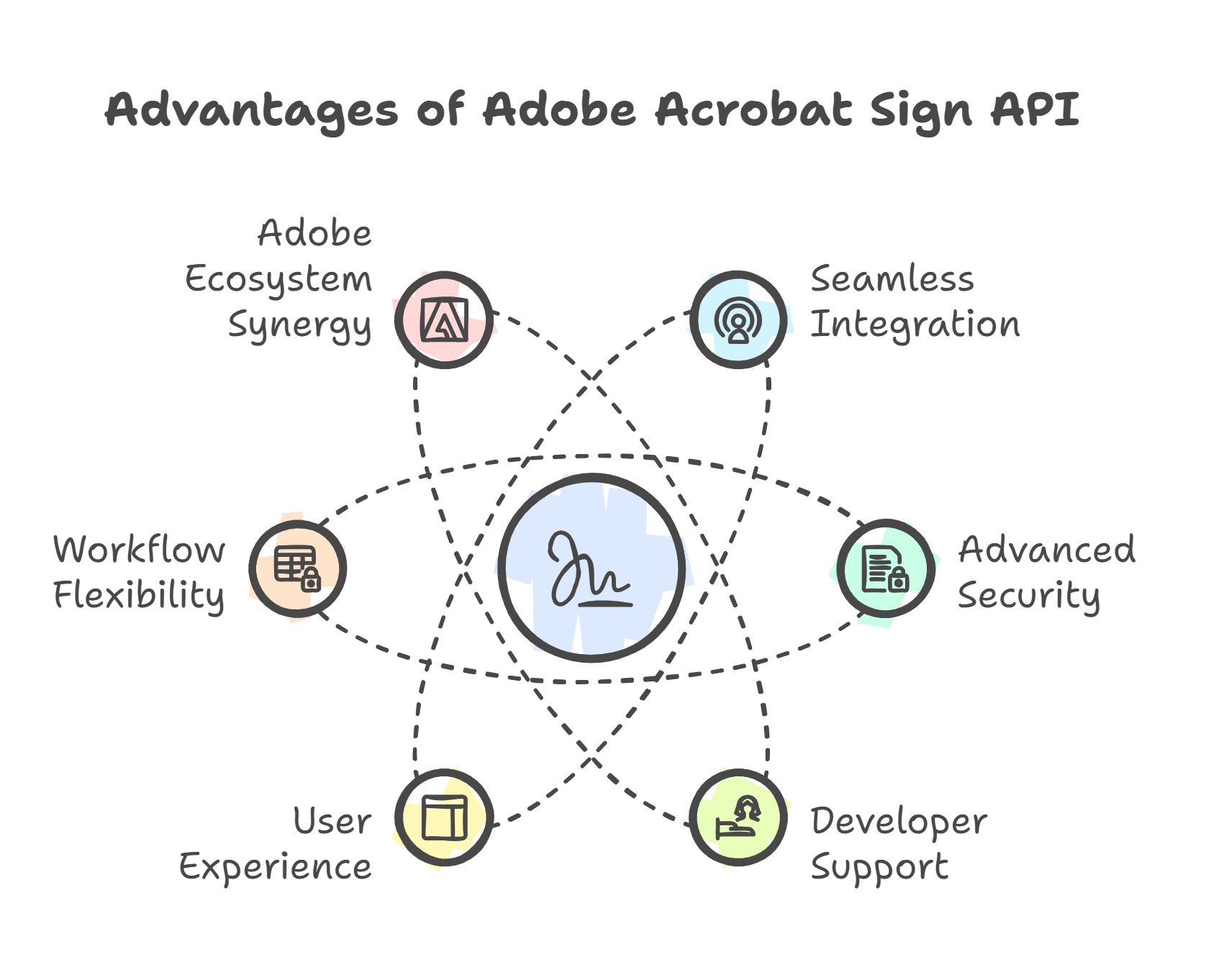
The Adobe Acrobat Sign API stands out for its comprehensive features and seamless integrations, making it a popular choice for businesses looking to automate eSignature workflows. Here are the pros of Adobe Acrobat Sign API that make it a compelling option:
1. Seamless Integration with Popular Platforms
- The Adobe Sign API integration seamlessly integrates with enterprise tools such as Salesforce, Microsoft 365, and other CRM platforms.
- Developers can integrate eSignature capabilities into apps and websites using well-documented REST APIs, enabling a custom signing experience tailored to business needs.
- Its scalable design ensures smooth operation as your business grows, whether you’re managing a handful or thousands of transactions.
2. Advanced Security and Compliance Features
- Compliance with industry standards like SOC 2, HIPAA, and FedRAMP ensures that sensitive documents remain secure.
- Features such as end-to-end encryption and detailed audit trails guarantee document integrity.
- Pre-built compliance workflows simplify adhering to legal and regulatory requirements, particularly for highly regulated industries like healthcare and finance.
3. Comprehensive Developer Support
- Adobe provides extensive developer resources, including documentation, sample code, and SDKs in multiple programming languages.
- Developer support through forums and help centres ensure smooth implementation of the Adobe Sign API features.
- The sandbox environment enables secure testing of workflows before deployment.
4. Enhanced User Experience
- Offers white-labelling options to match the signing interface with your brand identity.
- Signers benefit from a highly intuitive experience across desktop, mobile, and web platforms, increasing document completion rates.
5. Automation and Workflow Flexibility
- Automate recurring workflows with triggers, webhooks, and notifications.
- Bulk document sending and tracking features save time for high-volume transactions.
- Integration with third-party automation tools enhances the flexibility of Adobe Sign API integration.
6. Synergy with the Adobe Ecosystem
- Organizations already using Adobe’s Creative Cloud or Acrobat Services suite can enjoy seamless interoperability between tools.
- Bundled pricing options make it cost-effective for businesses already invested in the Adobe ecosystem.
The Adobe Acrobat Sign API features offer robust integrations, advanced security, and a user-friendly experience, making it a preferred choice for organizations looking to digitize document workflows effectively.
The Cons of Adobe Acrobat Sign API
While the Adobe Acrobat Sign API offers significant advantages, it’s essential to understand its limitations. These cons of Adobe Acrobat Sign API can impact its suitability for specific use cases, particularly for businesses with unique requirements or high transaction volumes.
1. High Costs for Small Businesses
- The Adobe Acrobat Sign API pricing can be steep, especially for smaller organizations with limited budgets.
- Advanced features and higher transaction volumes are only available on premium plans, potentially making it cost-prohibitive for businesses with moderate needs.
2. Default Transaction and API Limitations
- File Size: Individual files are capped at 10MB. Attempting to upload larger files triggers an “Upload limit exceeded” error.
- Page Limit: Transactions cannot exceed 500 pages in total. For documents larger than this, users encounter errors preventing agreement creation.
- Signer Limit: A maximum of 25 signers can be added to a single transaction, restricting use cases requiring broader collaboration.
- These default values are designed to prevent rate throttling but may require professional service adjustments for higher thresholds.
Upload large volume files with Certinal eSign
3. Challenges with Subscription Management
- Users frequently report difficulties with turning off auto-renewal, leading to unexpected charges.
- Cancellation fees further complicate the process, frustrating customers looking to transition to other solutions.
4. Complexity in Advanced Features
- Advanced workflows, such as witness signatures or modifying agreements after sending, can be complex and require technical expertise.
- This adds a layer of difficulty for businesses that lack in-house developers or experience.
5. Customer Support Concerns
- Inconsistent customer service quality and long wait times are frequently cited issues.
- These challenges can cause delays in resolving technical problems, which is critical for time-sensitive workflows.
6. Accessibility and Performance Limitations
- Users have reported performance issues on mobile devices, particularly in areas with poor internet connectivity.
- This can create roadblocks for mobile-dependent teams or remote workers.
7. Rate Throttling for High-Volume Usage
- Rate throttling limits transaction volumes to ensure server performance, which can be restrictive for businesses with significant eSignature needs.
- Companies handling thousands of daily transactions may find these restrictions cumbersome.
8. Learning Curve for Developers
- Developers unfamiliar with the platform often face a steep learning curve due to the complexity of certain API workflows.
- While Adobe provides comprehensive documentation, the level of technical skill required to optimize its use can be challenging for less experienced teams.
These limitations, including Adobe Acrobat Sign API pricing, transaction thresholds, and advanced feature complexities, underscore the need for a detailed evaluation of your specific use case before adopting the platform.
How to Integrate Adobe Acrobat Sign APIs in Your Business
The Adobe Acrobat Sign API is a robust solution for embedding e-signature capabilities into applications. It enables businesses to streamline workflows, automate processes, and improve operational efficiency. Here’s a step-by-step guide to help you integrate the API for your business needs.
1. Understanding Adobe Acrobat Sign API
The Adobe Acrobat Sign API allows you to:
- Automate eSignature workflows, from creating and sending agreements to tracking their completion.
- Embed document management features into your applications, including real-time status updates.
- Customize workflows to meet unique business requirements, whether for contracts, NDAs, or approvals.
2. Setting Up Your Adobe eSign API Environment
a. Create a Developer Account
- Sign up for a free Adobe developer account to access sandbox testing environments.
- The sandbox allows you to experiment with API calls, document uploads, sign documents, and signing workflows.
b. Discover API Access Points
- Adobe deploys its API across global shards (e.g., NA1, EU1, JP1). Your adobe sign account’s shard determines your API base URL.
c. Authentication via OAuth 2.0
- Register your application on Adobe’s developer portal.
- Obtain the Application ID and Client Secret to generate access tokens and refresh tokens for secure API interactions.
3. Automating Document Creation and Upload
a. Generating PDF Documents for Signing
- Start with a Word document template and convert it into a PDF.
- Use the Document Generation API, which automates PDF creation from templates, enabling consistent formatting.
b. Uploading Transient Documents
- Upload documents as transient files, valid for seven days.
- Reference the transientDocumentId in subsequent API calls for workflows such as Web Forms or agreements.
4. Customizing and Sending Agreements
a. Working with Web Forms
- Create Web Forms: Upload a transient document and generate a hosted Web Form via the /widgets endpoint.
- Add Fields: Use the drag-and-drop editor to add text, signature, or data input fields, ensuring forms are intuitive for users.
b. Sending Documents for Signing
- Share Web Form URLs via email or embed them on your website.
- Monitor agreements in real-time and send reminders as deadlines approach using the /agreements/{agreementId}/reminders API endpoint.
5. Managing Agreements and Advanced Features
a. Tracking Agreement Participants
- Use the /agreements/{agreementId}/members API endpoint to retrieve participant details and track signer statuses.
b. Handling Subsequent API Calls
- Use valid OAuth tokens for each API call, refreshing tokens as needed.
- Implement robust error-handling mechanisms to manage exceptions and maintain workflow continuity.
6. Best Practices for Integration
To ensure seamless integration, consider the following:
- Scalability: Ensure the API can handle your anticipated transaction volumes.
- Testing: Use the sandbox environment to validate workflows before moving to production.
- Automation: Leverage webhooks and the Document Generation API to streamline processes.
- Compliance and Security: Follow compliance standards such as SOC 2, HIPAA, and GDPR and use secure encryption to protect data.
7. Troubleshooting and Support
a. Common Errors and Solutions
- File Size Limits: Ensure uploaded documents do not exceed 10MB.
- Token Expiry: Refresh tokens before expiration to maintain uninterrupted API access.
b. Support Resources
- Explore the Adobe Developer Guide for detailed instructions.
- Join Adobe’s community forums for insights and troubleshooting tips. Additionally, contact you dedicated support.
Following these steps will allow you to unlock the full potential of the Adobe Acrobat Sign API and transform your business workflows with automated, secure, and scalable eSignature solutions.
What to Look for in an eSignature API
Choosing the right eSignature API is a critical decision for businesses looking to enhance efficiency and streamline workflows. While evaluating options, consider these key factors to ensure the solution aligns with your needs:
1. Scalability and Flexibility
- Ensure the API can scale with your business as transaction volumes grow.
- Look for solutions that allow you to customize limits, such as file sizes, page counts, or signer thresholds, without significant additional costs.
2. Pricing Transparency and Affordability
- Opt for an API with clear, transparent pricing models that fit your usage needs.
- Beware hidden fees for features like premium transactions, auto-renewals, or cancellations.
3. Developer-Friendliness
- A good API should have well-documented resources, sample code, and SDKs to make integration straightforward.
- Evaluate the availability of sandbox environments for testing workflows and the learning curve for implementing advanced features.
4. Advanced Features and Usability
- Consider whether the API supports advanced workflows, such as witness signatures, multi-signer transactions, or document editing after sending.
- Ensure these features are intuitive to implement and do not require extensive technical support.
5. Compliance and Security
- Verify that the API meets compliance standards relevant to your industry, such as GDPR, SOC 2, or HIPAA.
- Check for security measures like encryption, audit trails, and fraud prevention tools to protect sensitive information.
6. Reliable Customer Support
- Assess the quality and responsiveness of customer support to address potential issues quickly.
- Look for dedicated, round-the-clock support rather than lengthy wait times or inconsistent service.
By considering these factors, you can identify an eSignature API that meets your business requirements while avoiding common pitfalls.
Certinal eSign API vs Adobe Acrobat Sign API: Why Certinal is a Better Alternative
When evaluating eSignature solutions, it’s essential to compare options based on features, pricing, integration capabilities, and overall user experience. While the Adobe Acrobat Sign API offers robust functionality, Certinal eSign API emerges as a superior alternative for businesses seeking flexibility, affordability, and cutting-edge technology.
Comparison Overview
| Feature | Adobe Acrobat Sign API | Certinal eSign API |
|---|---|---|
| File Size & Transaction Limits | File uploads are capped at 10MB; transaction limits at 500 pages and 25 signers. | Larger file size and transaction thresholds with customizable limits to support complex workflows. |
| Security and Compliance | SOC 2, HIPAA, and FedRAMP compliant; strong encryption. | Equally robust compliance (SOC 2, HIPAA, GDPR), with additional AI-driven workflow automation. |
| Customization & Branding | Limited white-labeling options. | Full branding control with customizable UI/UX for seamless integration. |
| Developer Support | Extensive documentation but a steeper learning curve. | Simplified API with comprehensive documentation, faster implementation, and proactive developer support. |
| AI-Powered Features | Basic automation for workflows. | Advanced AI capabilities for predictive analytics, fraud prevention, and dynamic workflow optimization. |
| Customer Support | Inconsistent response times are often cited as a pain point. | Dedicated, round-the-clock support with faster resolution times. |
Why Choose Certinal eSign API?
- Enhanced Scalability: With customizable transaction limits and higher file size thresholds, Certinal is ideal for businesses with diverse or high-volume signing needs.
- AI-Driven Innovation: Certinal leverages advanced AI technologies to provide features such as Auto-Summarization of Contracts
- Global Compliance: Certinal ensures compliance with local and international regulations, including GDPR, eIDAS, and much more catering to businesses worldwide.
- User-Centric Approach: Certinal prioritizes seamless integrations, user-friendly APIs, and exceptional customer support, ensuring faster onboarding and better user experiences.
By choosing Certinal eSign API, businesses can unlock greater value, flexibility, and innovation than Adobe Acrobat Sign API, making it the smarter choice for forward-thinking organizations.
Simplify Your eSignature Workflows with Certinal eSign API
The Adobe Acrobat Sign API is a reliable tool for integrating e-signature capabilities into business workflows. It offers robust features and extensive integrations. However, limitations such as high pricing, transaction caps, and customer support challenges may make it less ideal for businesses seeking flexibility and scalability.
In comparison, the Certinal eSign API stands out as a superior alternative. It provides cost-effective pricing, customizable transaction limits, advanced AI-driven features, and exceptional customer support. Certinal’s transparent, user-friendly approach ensures a seamless integration experience for developers and businesses alike.
If you’re evaluating eSignature APIs to enhance your digital workflows, now is the time to explore how Certinal eSign API can deliver greater value, efficiency, and innovation.
Experience the difference for yourself - schedule a free demo of Certinal eSign API today! Let our experts show you how Certinal can revolutionize your document workflows and help your business thrive.
Frequently Asked Questions (FAQs)
1. What is the difference between REST and SOAP APIs in the context of eSignatures?
REST APIs are typically preferred for eSignature solutions because they are lightweight, easier to implement, and support multiple data formats like JSON. SOAP APIs, while more complex, offer enhanced security features and are often used in highly regulated industries. The choice depends on your business’s technical requirements and existing systems.
2 .Can eSignature APIs integrate with low-code or no-code platforms?
Yes, many modern eSignature APIs, including Certinal and Adobe Acrobat Sign APIs, offer integration capabilities with low-code or no-code platforms like Zapier or Power Automate. This allows businesses to implement eSign workflows without requiring extensive developer expertise.
3 .Can I integrate an eSignature API with my existing software?
Yes, most eSignature APIs, including Certinal and Adobe Acrobat Sign, offer integration capabilities with popular tools like Salesforce, Microsoft 365, and Google Workspace. Additionally, RESTful APIs enable developers to embed eSignature functionalities into custom-built applications or workflows.
4 .How do transaction limits in eSignature APIs affect businesses?
Transaction limits can restrict the number of documents you can send or sign within a given period, potentially disrupting workflows for high-volume users. For businesses that frequently process large transactions, customizable thresholds or APIs with higher limits, like Certinal eSign API, may be more suitable to prevent bottlenecks.


