

DocuSign eSign API Pricing Explained: Plans, Costs, and the Best Alternatives in 2025
For businesses embracing automated workflows, selecting the right eSignature API can significantly impact operational efficiency and scalability. Among the most popular solutions, DocuSign eSign API has become a go-to for embedding digital signing capabilities into workflows. However, as with any enterprise-grade solution, understanding the true cost of ownership is key to making an informed decision.
DocuSign API pricing structure often extends beyond its advertised plans, with hidden costs emerging from scalability limitations, feature add-ons, and overage fees. These costs, compounded by opportunity costs - such as delays from scalability bottlenecks or vulnerabilities from security risks - can significantly impact a business’s operational efficiency and financial predictability.
In this blog, we’ll explore:
- The breakdown of DocuSign API pricing tiers.
- Scalability roadblocks, such as envelope and request limits.
- Critical security concerns, including recent high-profile exploits.
- Alternatives to DocuSign that offer cost-efficiency, robust capabilities, and enterprise-grade security.
By the end of this blog, you’ll have the insights needed to evaluate whether DocuSign is the right fit for your business or if it’s time to explore smarter, more cost-effective alternatives.
What is an eSignature API, Why is it Needed, and the Use Cases
An API (Application Programming Interface) acts as a bridge, enabling different software applications to communicate seamlessly. APIs facilitate data exchange and automate workflows, eliminating manual intervention.
Why is an API Needed for eSignatures?
eSignature APIs integrate electronic signature functionalities into existing platforms like CRMs, ERPs, or HR tools. They simplify document workflows, improve efficiency, and provide a seamless experience for users and customers.
Use Cases of eSignature APIs:
1. Sales and Contracts: Automate signing in CRMs like Salesforce.
2. HR Onboarding: Streamline offers letters and agreements with embedded signing.
3. Procurement: Accelerate purchase approvals in procurement tools.
4. Legal: Manage NDAs and agreements securely and efficiently.
5. Customer Service: Enable in-app signing for customer-facing interactions.
Want to dive deeper into eSignature APIs? Check out our detailed guide here: eSignature API Explained.
What is a DocuSign eSignature API?
The DocuSign eSignature API is a robust tool that allows businesses to integrate electronic signature capabilities directly into their applications, streamlining document management and automating workflows. Its core capabilities include:
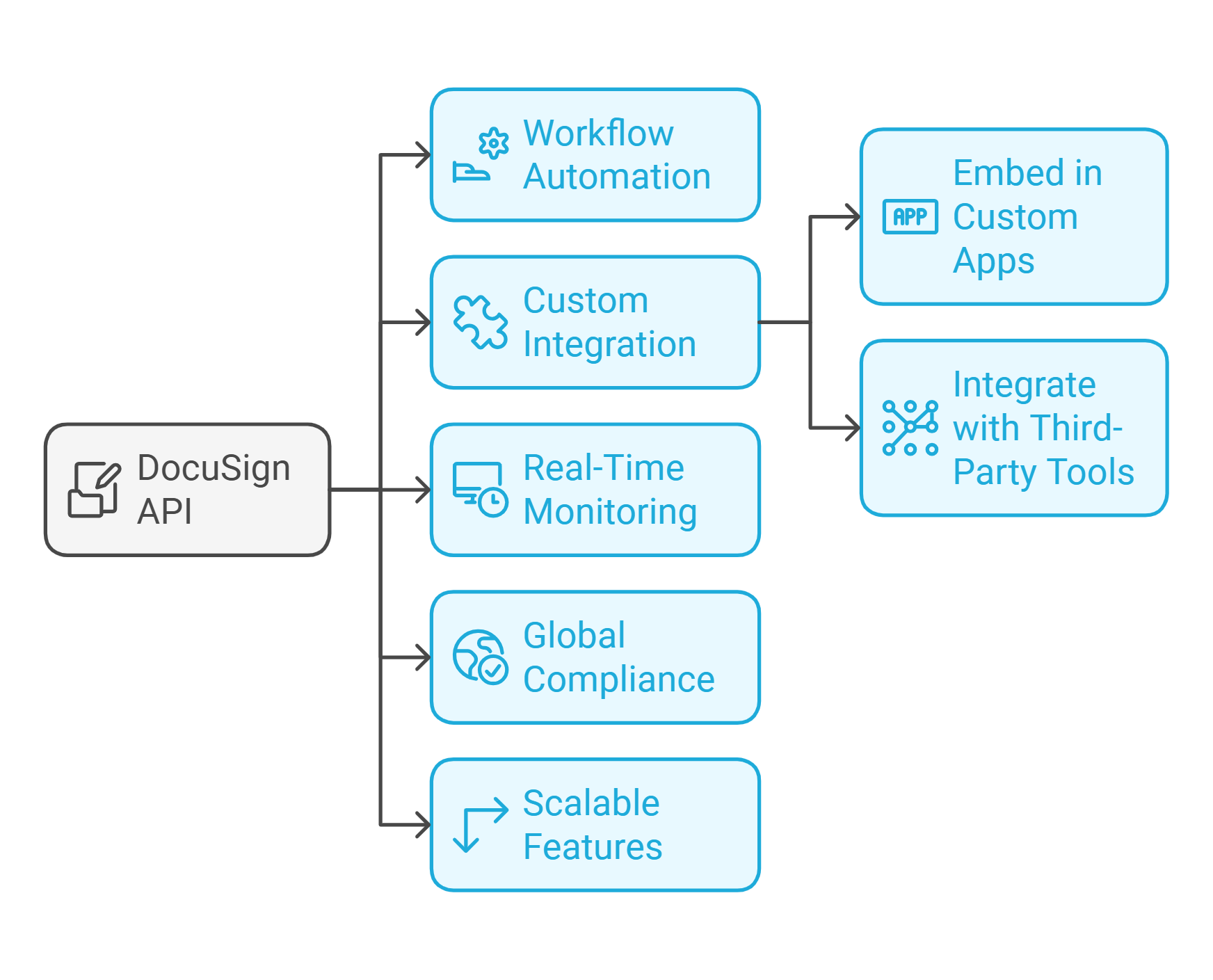
What are the Core Capabilities of DocuSign API?
- Workflow Automation: Automate repetitive tasks like document preparation, routing, and approvals to accelerate transaction timelines.
- Custom Integration: Embed signing functionalities into custom applications or widely used third-party tools like Salesforce, Microsoft, and Google Workspace.
- Real-Time Monitoring: Track the status of documents in real-time, ensuring that delays or bottlenecks are identified and resolved promptly.
- Global Compliance: It adheres to international eSignature standards, including eIDAS, the ESIGN Act, and UETA, making it legally binding across multiple jurisdictions.
- Scalable Features: This feature offers tools like reusable templates, bulk sending, and multi-language support for global teams and customers.
While these capabilities make DocuSign a powerful choice for e-signature needs, businesses must carefully consider its scalability and security limitations before implementing it.
Learn in detail about Docusign
Scalability Challenges of DocuSign eSignature API
Despite its robust functionality, DocuSign eSignature API presents several scalability constraints, particularly for enterprises with high transaction volumes or complex workflows:
1. Request Limits: The API caps the number of requests an account can make per hour or day, creating delays for organizations with large-scale operations. For example, sales teams managing multiple contracts may face interruptions during peak activity.
2. File Size Restrictions: The maximum file size for documents is capped at 25 MB. This limitation poses challenges for industries like legal or construction, where contracts often include detailed diagrams or embedded images.
3. Polling Rate Limits: The API limits the frequency of polling requests to retrieve document status updates, which can delay real-time workflows like tracking contract signatures.
4. Envelope and Template Caps: Restrictions on the number of envelopes (signed documents) and templates restrict businesses from scaling repetitive workflows efficiently, such as onboarding employees or processing customer agreements.
5. HTTP and Anchor Tab Limits: Additional restrictions on the number of HTTP requests and anchor tabs (dynamic fields for signers) can create bottlenecks in complex workflows requiring frequent updates or precise field placements.
DocuSign eSignature API Security Concerns
In addition to scalability limitations, DocuSign eSignature API has faced security vulnerabilities that could expose businesses to risks. Recent incidents where DocuSign failed to secure its platform adequately have highlighted these concerns:
- Fake Invoice Exploits: Hackers exploited DocuSign’s API to send realistic-looking fraudulent invoices, tricking recipients into sharing sensitive information or making unauthorized payments.
- Phishing Attacks: Cybercriminals used DocuSign’s API to mimic legitimate document requests, targeting large businesses with fraudulent transactions. These attacks not only compromise data security but also damage brand reputation.
4.1 Business Impact of Poor API Security
- Reputational Damage: Security vulnerabilities can erode trust with clients, partners, and customers.
- Operational Disruptions: Breaches and phishing attacks can cause downtime, delays, and additional resource allocation to address the issue.
- Compliance Risks: Compromised data can lead to regulatory fines and legal consequences, especially in sectors like finance and healthcare.
These security concerns highlight the importance of selecting an eSignature API that prioritizes reliability and robust safeguards for businesses handling sensitive data or operating in regulated industries.
Learn about pros and cons of Docusign
Is DocuSign eSign API Pricing Right for Your Business?
While DocuSign eSignature API offers extensive capabilities and integrations, its pricing structure and scalability limitations often leave businesses grappling with additional costs, inefficiencies and security risks. Next, we break down DocuSign API pricing tiers and highlight the critical cost factors to help you assess if they align with your business needs.
DocuSign API Pricing Plans
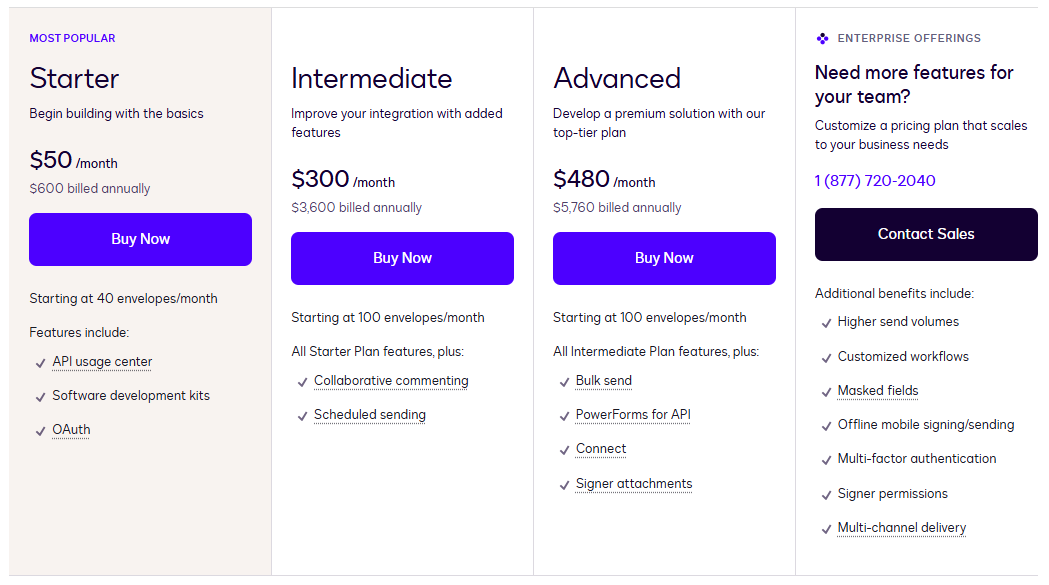
DocuSign API pricing tiers cater to businesses of various sizes and needs. These plans are primarily structured around envelope allowances (document transactions) and available features. Here’s a breakdown of the current DocuSign API pricing tiers:
Developer Account (Free)
DocuSign offers a free DocuSign Developer Account as an entry point to test its API capabilities. With this plan, developers can explore DocuSign’s API sandbox environment to build and test integrations. While useful for initial prototyping, please note it lacks production-level functionality and limits signature invites, making it unsuitable for live business operations.
Starter Plan ($61/Month )
The Starter Plan includes 40 monthly envelopes, offering foundational API access, OAuth authentication, and basic developer tools like SDKs. It’s designed for small-scale usage or businesses testing DocuSign’s production environment. However, critical features like bulk sending and advanced branding are absent, and overage fees can significantly increase business costs exceeding the envelope limit.
Intermediate Plan ($366/Month)
The Intermediate Plan expands capabilities with features like collaborative commenting, custom branding, and scheduled sending. It includes 100 monthly envelopes, making it more suitable for small teams. However, advanced automation features and scalability for larger teams remain limited, often requiring an upgrade to higher tiers.
Advanced Plan ($586/Month)
The Advanced Plan includes 100 monthly envelopes and offers enhanced features like bulk sending, reusable PowerForms, and integrations with DocuSign Connect for real-time updates. While it caters to mid-sized businesses with moderate needs, the persistent envelope limit and additional fees for overages or advanced support can make it less cost-effective for high-volume users.
Enterprise Plan (Custom Pricing)
The Enterprise Plan is designed for large organizations with high transaction volumes and complex requirements. It includes premium features like custom workflows, multi-factor authentication, and offline signing. However, pricing is customized based on usage, and additional costs often apply for advanced features or API scalability, making cost predictability a challenge.
While DocuSign’s plans cater to businesses of varying sizes, restrictive envelope limits, overage fees, and gated features across tiers often complicate scalability and cost predictability.
5 Factors That Impact DocuSign API Pricing
DocuSign’s API pricing is influenced by several variables that can make costs unpredictable, especially for growing businesses or high-volume workflows. Here are the key factors to consider:
API Call Volume: DocuSign API pricing is tied to the number of API calls (requests) you make each month. Each plan includes a set envelope limit, and exceeding these limits results in overage fees, which can quickly escalate costs for businesses handling large transaction volumes.
User Licensing: DocuSign API pricing also scales with the number of user licenses (seats). Adding more users - especially across departments or teams - drives up costs, making it less flexible for rapidly scaling businesses.
Premium Features and Add-Ons: Features like bulk sending, advanced branding, and PowerForms are often restricted to higher-tier plans or come at an additional cost. Enterprises requiring advanced tools may need to upgrade, significantly increasing their DocuSign Enterprise API costs.
“Product’s pricing can be a consideration for some organizations, especially those with high document volume or extensive collaboration needs. The cost may increase with the need for advanced features, such as custom branding or API access“
Support and Customization: While premium support options, like priority assistance or dedicated success managers, are crucial for enterprise workflows, these services typically come at an added cost. Custom integration requirements may also drive up development expenses.
Long-Term Contracts: While annual plans offer some savings, they also lock businesses into long-term commitments. Switching providers mid-term can incur penalties, adding to the overall cost burden.
How the DocuSign API Pricing Stack Up Against the Alternatives
When evaluating eSignature APIs, it’s crucial to compare costs and features across providers. While it is a popular choice, DocuSign API pricing can be prohibitive for businesses requiring predictable and scalable solutions. Here’s how DocuSign API pricing stacks up against leading alternatives:
| Provider | Starting Price | Envelope/Signature Limits | Key Features | Best For |
|---|---|---|---|---|
| Certinal eSign API | Tailored Pricing | Unlimited Signature Requests | No hidden fees, AI-driven workflows, enterprise-grade compliance | Enterprises needing predictable, feature-rich pricing |
| DocuSign API | $50/month (Starter) | 40 envelopes/month | Basic API, OAuth, and overages apply | Large enterprises with advanced needs |
| SignNow API | $84/year (Starter) | 500/year (Starter Plan) | Embedded signing, unlimited apps, legally binding | SMBs with low annual usage |
| Zoho Sign API | $0.5/Signature Request | No Monthly or Annual Commitment | Text tags, recipient workflows, OTP authentication | Businesses requiring flexible field management |
| Dropbox Sign API | $100/month (Essentials) | 50/month | Embedded signing, templates, audit trails | Businesses with low-volume needs |
| Signeasy API (Intermediate) | $125/month (Intermediate) | 1,000/year | Unlimited templates, webhooks, embedded signing | Growing businesses with moderate workflows |
1. Certinal eSign API
- Pricing: Transparent, flexible plans with no hidden fees or add-on costs.
- Signature Limits: Unlimited API usage - no penalties for high transaction volumes.
- Key Features of Certinal eSign API:
- eSignature REST API for Seamless Integration: Certinal’s REST API is designed for simplicity and scalability, offering developers a robust toolset for quick integration with existing systems, including CRMs, ERPs, and custom applications.
- AI-Powered Automation: Streamline workflows and reduce manual intervention with intelligent automation.
- Document Management and Transactions:
- Securely upload documents for signing and add additional documents to ongoing transactions.
- Track documents directly and manage the lifecycle of eSignature transactions, including actions like sending reminders, withdrawing, or cancelling transactions.
- Download completed transaction documents or generate signing URLs for pending participants.
- Template and Workflow Flexibility:
- Retrieve and manage user-specific templates or template details using advanced APIs.
- Enable dynamic document preparation with placeholder tags, embedded sending, or preconfigured workflows integrated directly into your application.
- Certinal enables automating forms to pre-fill documents.
- Advanced Workflow Automation:
- Utilize webhooks for real-time, event-driven updates to monitor transaction and workflow changes.
- Access signing groups for streamlined group-based participation and navigation via redirection URLs.
- User and Account Management:
- Seamlessly manage account users with APIs for adding individual users or bulk uploads.
- Ensure flexible and scalable user permissions to align with organizational needs.
Certinal is the only provider offering all enterprise-level capabilities with a transparent pricing model, unlimited API usage, and advanced compliance features. Thus, it is the best alternative to DocuSign API pricing tiers for businesses of all sizes.
Discover 13 Reasons Why Enterprises are Switching to Certinal eSign
2. SignNow API
- Pricing:
- Starter: $84/year (500 signature invites annually).
- Professional: $146/year (1,000 signature invites annually).
- Premium: $250/year (2,000 signature invites annually).
- Enterprise: $500/year (5,000 signature invites annually).
- Key Features:
- Embedded signing for seamless in-app signature processes.
- Legally binding eSignatures compliant with global standards.
- Unlimited app integrations for streamlined workflows.
- Automatic volume discounts as usage scales.
- Limitations: Signature invites are capped based on pricing tier. Exceeding the yearly limit requires an upgrade.
- Best For: Small to medium-sized businesses (SMBs) with predictable, low-to-moderate signature needs.
SignNow offers affordable entry-level plans with flexible options, making it a good choice for budget-conscious SMBs; however, enterprises comparing DocuSign API pricing tiers may find the usage limits restrictive.
3. Zoho Sign API
- Pricing: $0.5 / Signature Request
- Key Features:
- Advanced recipient workflows: approver actions, in-person signing, and multi-authentication methods (email, SMS OTP, and 3rd-party verification).
- Text-based tags and automatic field detection for faster setup.
- Unlimited templates and audit trails for compliance.
- Webhooks for real-time notifications and automation.
- Mobile and web SDKs for PHP, iOS, and Android.
- Limitations:
- Features like embedded sending and SDKs are still in BETA.
- Pricing scales with user count and API usage volume.
Zoho Sign is well-suited for businesses needing field-intensive workflows, native integrations, and flexible pricing. It is positioned as a competitive option in the DocuSign API pricing comparison for affordable and customizable solutions.
4. Dropbox Sign API (formerly HelloSign)
- Pricing:
- Essentials: $100/month for 50 signature requests.
- Standard: $300/month for 100 signature requests.
- Premium: Custom pricing for high volumes with discounts.
- Key Features:
- Embedded signing and requesting for in-app document execution.
- Templates with signer fields and data validation.
- Audit trail to track every action for compliance.
- Bulk sending and branding options in Standard and Premium plans.
- SDKs are available in 6 languages for easy integration.
- Limitations:
- Signature requests are strictly capped; overages can quickly increase costs.
- Premium features like eID, advanced signer fields, and multiple domains require the highest tier.
Dropbox Sign is ideal for teams needing developer-friendly APIs with clean integrations. However, its high overage costs and limited signature requests may make it less attractive than DocuSign API pricing and alternatives like Certinal.
5. Signeasy API
- Pricing:
- Starter: Free sandbox with 100 signature requests.
- Intermediate: $125/month (1,000 signature requests annually).
- Advanced: $250/month (2,000 signature requests annually).
- Key Features:
- Unlimited templates for repeated workflows.
- Merge fields and text-based field placement for document precision.
- Embedded signing and sending for seamless in-app user experiences.
- Webhooks to trigger automated actions.
- Advanced features like stamps, authentication, and usage reports in higher tiers.
- Limitations:
- Strict annual signature limits per pricing tier.
- Higher pricing for advanced features.
Signeasy provides a strong middle ground for growing businesses scaling their eSignature workflows, but its higher costs for advanced features make it less competitive against the alternatives to DocuSign Pricing.
Why Certinal eSign API is the Best Alternative to DocuSign API
- While DocuSign API pricing tiers offer advanced features, they often include hidden fees, overage costs, and premium charges for essential tools. Certinal eSign API eliminates these limitations with transparent, predictable pricing and unlimited API usage across all plans.
- Certinal eSign includes enterprise-grade features - AI-driven workflows, global compliance (GDPR, SOC2, HIPAA), bulk sending, and embedded signing - without additional costs. Unlike DocuSign Enterprise API costs, which can escalate with overages and add-ons, Certinal’s pricing is built for scalability, making it ideal for high-volume workflows.
- Moreover, Certinal provides free 24/7 personalized support and onboarding, a stark contrast to DocuSign API pricing, which often charges extra for premium support.
- For businesses comparing alternatives to DocuSign API pricing, Certinal offers unmatched value. It combines comprehensive features, scalability, and cost-efficiency in one solution.
Make the Switch to a Limitless eSignature API
Experience the freedom of unlimited API access, advanced features, and transparent pricing - all in one platform. Schedule a Demo and Experience Certinal eSign API Today
Frequently Asked Questions (FAQs)
1. How much does DocuSign API cost per month?
DocuSign API plans start at $61/month for the Starter Plan (40 envelopes per month) and go up to $586/month for the Advanced Plan (100 envelopes per month). The Enterprise Plan offers custom pricing based on specific business needs.
2. What is the price for DocuSign API’s Enterprise Plan?
The Enterprise Plan pricing is customized based on transaction volume, user count, and required features. It is tailored for large-scale operations but often includes additional costs for advanced tools and overage fees.
3. Are there hidden costs in DocuSign API pricing?
Yes, hidden costs can include overage fees for exceeding envelope or API call limits, additional charges for premium features like bulk sending or advanced branding, and higher fees for enhanced support options.
4. Does DocuSign charge for exceeding envelope limits?
Yes, exceeding the monthly envelope limit incurs overage fees, which vary based on the plan. These costs can significantly increase for businesses with high-volume workflows.
5. Is there a free plan available for DocuSign API?
DocuSign offers a free Developer Account for testing in a sandbox environment. However, it is limited to development purposes and does not support live business operations.
6. How does the pricing of DocuSign API compare to alternatives like Certinal eSign?
Certinal eSign offers unlimited API usage and transparent pricing with no overage fees, making it more cost-effective compared to DocuSign API, which charges per envelope and for additional features.
7. Does DocuSign API offer discounts for annual plans?
Yes, annual plans may offer discounts compared to monthly billing, but they also lock businesses into long-term contracts, which can be restrictive.
8. How are overage fees calculated for DocuSign API?
Overage fees are charged per additional envelope or API call beyond the plan’s limit. The rates for these fees are not explicitly published, making cost predictability challenging.
9. Are bulk sending features included in all DocuSign API plans?
No, bulk sending is only available in the Advanced and Enterprise Plans. Businesses on lower tiers must upgrade to access this feature, adding to the total cost.


